Meet SIGNEXA
Operations

Command Center Dashboard

Your real-time operational hub. Monitor every job, team metric, and business KPI from one unified control panel.
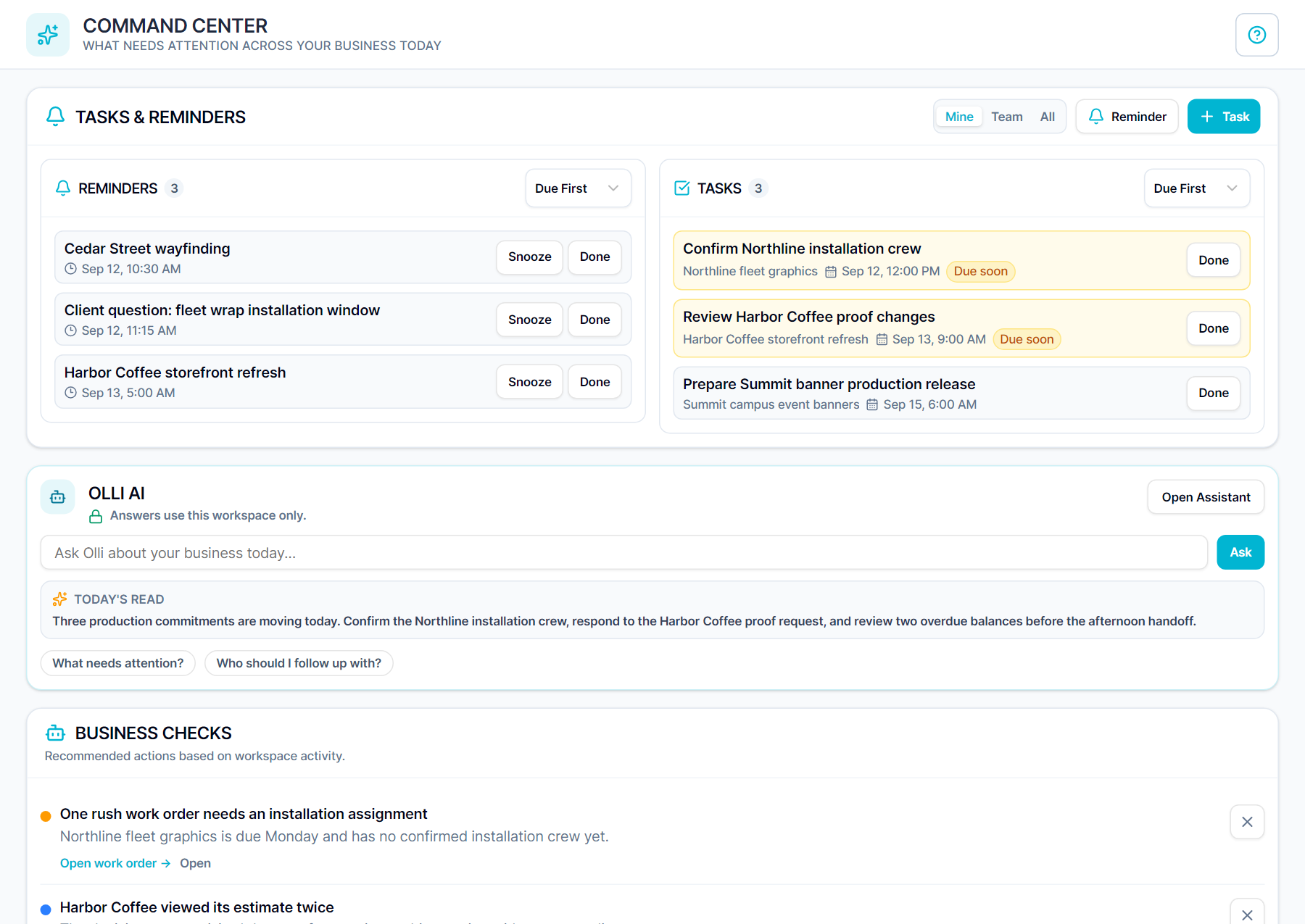
Command Center Dashboard — Meet SIGNEXA platform interface

Run Your Entire Business from One Screen

The Command Center is the nerve center of your Meet SIGNEXA workspace. See everything — active jobs, team capacity, revenue snapshots, and pending approvals — without clicking through a dozen menus. Designed for owners and managers who need full situational awareness without information overload.

Real-Time Job Status

See every active job, its current production stage, and who owns it — live, without refreshing.

Revenue Snapshot

Daily and weekly revenue metrics displayed front and center so you always know where you stand financially.

Team Activity Feed

Monitor what your team is working on right now. Spot idle capacity and reassign before the day slips.

Everything in One View

Stop toggling between your CRM, production board, and finance tools to piece together the state of your business. The Command Center surfaces critical metrics from every module in a single, customizable dashboard. Own the room in morning stand-ups with live production data at your fingertips.

Real-time business command center dashboard

Prioritized Action Items

The Command Center intelligently surfaces the tasks that need your attention: overdue job tickets, unread customer messages, invoices past due, and estimates awaiting approval. No more missed follow-ups buried in email threads. Act on what matters, right now.

Priority action items and alerts in business dashboard

Frequently Asked Questions

Everything you need to know about Command Center Dashboard.

Can I customize what appears on the Command Center dashboard?
Yes. Widget panels are configurable per user role. Owners pin revenue snapshots and team utilization. Managers pin production queue and bottleneck alerts. Front-desk coordinators pin pending quotes and client messages. Everyone sees the view that makes them most effective.
Does the Command Center update in real time?
Yes. All metrics are pushed live. Job stage changes, new payments, incoming support tickets, and team clock-ins reflect immediately without refreshing the page. You always see the current state of your business, not a five-minute-old snapshot.
Can multiple team members use the Command Center at the same time?
Yes. Every team member has a personalized view based on their role and assigned jobs. The owner sees the full business. Operators see only their station. Coordinators see their client queue. No one is stepping on each other's view.
What types of priority alerts does the Command Center surface?
The Command Center intelligently flags: overdue job tickets nearing or past deadline, estimates that have gone 3+ days without client response, invoices 30/60/90 days past due, new inbound CRM leads waiting for follow-up, help desk tickets past SLA, and machine queue steps waiting on missing approvals or materials. Everything that needs your attention, ranked by urgency.
Is the Command Center available on mobile devices?
Yes. The Command Center is fully responsive. Check your production load, recent revenue, and priority alerts from your phone on the way to the shop or between client visits.
How does the Command Center help with managing a growing team?
As your team grows, the Command Center becomes the morning meeting replacement. One screen tells you who is working on what, what's blocked, what shipped yesterday, and what needs to be done today. Managers cut daily check-in time dramatically because everyone has visibility before the first conversation.

Ready to Transform Your Workflow?

Join thousands of shops scaling their operations with Meet SIGNEXA. No credit card required.
