Global Inbox & AI Follow-Up for Sign & Print Shops
Connect supported email accounts and manage client conversations from inside your Meet SIGNEXA workspace. Keep quote context, CRM follow-up, reminders, and team handoffs visible in one place.
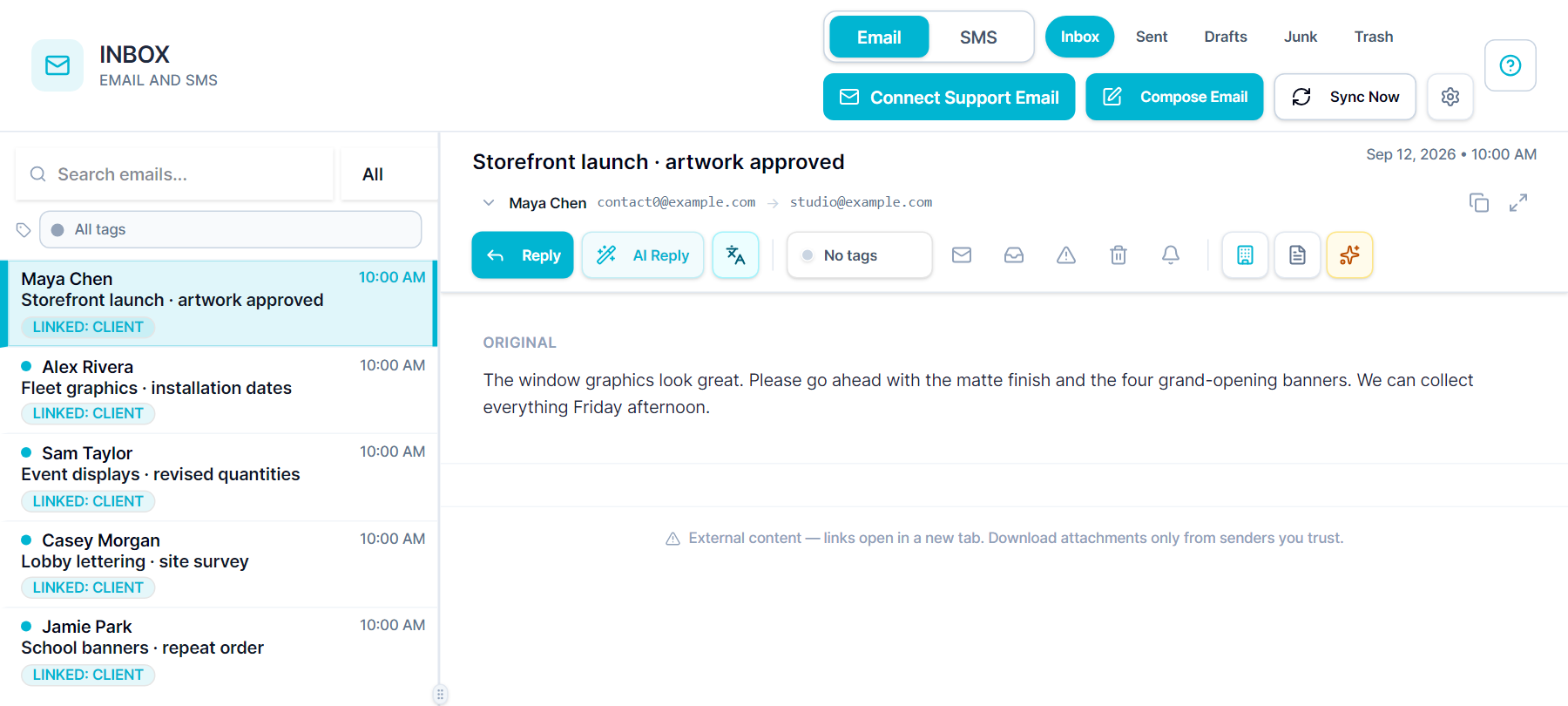
Most shop owners juggle Gmail in one tab and their management software in another - copying names, pasting addresses, and manually following up on every open quote. Meet SIGNEXA's Global Inbox eliminates that entirely. Connect your Gmail or SMTP accounts and your entire client email history lives inside your workspace - searchable, tagged, and tied to CRM contacts, open quotes, active jobs, and invoices. When a client emails asking for a price, one click generates a professional estimate from the conversation. When a new prospect writes in, AI extracts their contact into your pipeline automatically. Translation support helps your team read and reply across supported email, chat, and voice conversations without splitting the customer history across tools.
Connect Real Email Accounts
Connect Gmail or any SMTP/IMAP account. All folders sync every 5 minutes - Inbox, Sent, Drafts, and more - right inside your workspace.
AI Quote Generation
Open any client email thread and generate a professional estimate in one click. AI reads the conversation and pre-fills the quote details - ready to send in seconds.
AI Lead Extraction
When a new prospect emails in, Meet SIGNEXA AI extracts their name, company, phone, and email into your CRM pipeline automatically - no manual data entry.
Follow-Up Reminders
Set a reminder on any thread and Meet SIGNEXA pings you when it's time to follow up. Never let a quoted prospect go cold because you forgot to check in.
Sequence Enrollment from Inbox
See a warm prospect going quiet? Enroll them in an automated follow-up sequence directly from the email thread - without switching tools.
SMS Threads in the Same View
Keep email and SMS conversations for every contact in one place, so your team can respond with the full client history in view.
Live Translation Across Conversations
Read and reply across supported email, chat, and voice conversations while keeping the original customer context available to your team.
Your Real Gmail. Inside Your Workspace.
Connect your existing Gmail account (or any SMTP/IMAP account) through the Inbox Settings. All your folders sync automatically - Inbox, Sent, Drafts, Junk, Trash. Every email thread is searchable by contact name, email address, subject, body, or attachment. Tags (Quote, Todo, Art, Billing, Done) keep your inbox organized without folders. Active sync runs every 5 minutes so your inbox is always current. Unlike generic helpdesk tools, this is your actual email - not a forwarded copy. Replies go from your real address and land in the recipient's inbox exactly as expected.
Turn Any Email Into a Quote in One Click
When a client emails asking for signage pricing, you normally read the email, open your estimating tool, re-enter the job details, build the quote, and copy the link back to Gmail. Meet SIGNEXA collapses that entire workflow to a single button. Open the thread, click Generate AI Quote, and the system reads the conversation and pre-fills a quote with the product type, dimensions, quantity, and client details it can extract. You review, adjust if needed, and send - from the same screen. The quote is linked to the email thread and the CRM contact automatically.
Never Let a Prospect Go Cold Again
Follow-up is easier to manage when the next action remains visible. Meet SIGNEXA's Inbox lets the team set reminders on threads and enroll a contact in an automated follow-up sequence when that workflow is configured. Review active enrollments so the team does not double-send.
AI Lead Extraction - Contacts Into CRM, Instantly
A new prospect emails your shop. Normally you'd read it, copy their name, paste it into your CRM, type their email, add their company, save the record, and link it to a pipeline stage. With Meet SIGNEXA, you click Extract Lead from the email thread. The AI reads the email, pulls the contact's name, email, phone, and company, and creates a CRM record pre-filled with everything it found - including the original email thread. You pick the pipeline stage, optionally enroll them in an automated follow-up sequence, and you're done. Thirty seconds from inbound email to active pipeline lead.
Frequently Asked Questions
Everything you need to know about Global Inbox & AI Follow-Up for Sign & Print Shops.
Does this replace Gmail or work alongside it?
It works alongside Gmail - your emails still live in your actual Gmail account. Meet SIGNEXA connects via IMAP and syncs your full mailbox every 5 minutes. You can reply from inside Meet SIGNEXA (the reply comes from your real Gmail address) or continue using Gmail directly for anything outside your client workflow. The two stay in sync.
Can I connect multiple email accounts?
Yes. Connect multiple Gmail or SMTP accounts - for example, a general info@ address and a personal sales@ account. Each inbox shows independently in the sidebar with its own sync status and unread count. Team members can each connect their own accounts and see only their own inbox.
How does AI quote generation from email work?
Open any email thread and click Generate AI Quote. Meet SIGNEXA's AI reads the thread content - the client's description of the job, dimensions mentioned, quantity, deadline, any attachments - and pre-fills a quote with what it can extract. You review the draft, adjust any fields, and send the estimate through the standard quoting workflow. The quote links back to the original email thread and the client record automatically.
What is AI lead extraction and when should I use it?
When a prospect emails your shop for the first time - or when you spot a client in your inbox who isn't in your CRM yet - click Extract Lead from the thread. The AI pulls their name, email, phone, and company from the email content and creates a CRM contact pre-populated with those details. You assign a pipeline stage and optionally start them in an automated follow-up sequence. Use it any time you want to turn a cold inbound email into an active sales opportunity without manual data entry.
How do follow-up reminders work?
On any email thread, click Set Reminder and choose when you want to be notified - in 2 hours, tomorrow morning, next week, or a specific date and time. When the reminder fires, the thread surfaces at the top of your inbox with a notification so you see it even if newer emails have buried it. Reminders are tied to the thread so you get the full context immediately when you click through.
Can I enroll an email contact in an automated sequence from the inbox?
Yes. From any thread, click Enroll in Sequence and choose the sequence you want to run. Meet SIGNEXA checks whether the contact is already active in another sequence and warns you if so - preventing accidental duplicate outreach. Once enrolled, the sequence runs on its defined schedule: timed follow-up emails go out automatically until the contact replies or the sequence completes. This connects directly to the Email Sequences module - the same sequences used for CRM pipeline automation.
How do SMS threads work in the inbox?
SMS conversations appear alongside email in the Global Inbox. Your team can view the full history and reply from the workspace, with every thread connected to the client record.
What email tags are available and can I customize them?
Default tags include Todo, Manager, Quote, Art, Billing, and Done. Tags are color-coded and appear on thread rows so you can scan your inbox and instantly see what needs action. You can customize tag labels and colors in settings. Tags are for your internal workflow - they're not visible to the client and don't affect the email itself.
How is the Global Inbox different from the Help Desk?
The Help Desk is structured around tickets - clients submit requests through a web form or email and your team manages a queue with SLA tracking, collision detection, and canned responses. The Global Inbox is your real connected email client - it's where proactive sales follow-up, AI quote generation, and lead extraction happen. Many shops use both: the Help Desk for structured post-sale support tickets and the Inbox for active sales conversations and client relationship management.
Ready to Transform Your Workflow?
Explore the connected workflow, compare plans, and decide whether Meet SIGNEXA fits your shop. No credit card required.