Meet SIGNEXA
Operations

Employee Timesheets & HR Payroll

Track shop hours accurately, manage team schedules, and export payroll seamlessly. Eradicate time theft.

Employee Timesheets & HR Payroll — Meet SIGNEXA platform interface

Frictionless Team Time Tracking

Stop using messy spreadsheets or ancient punch clocks to track your team's hours. Meet SIGNEXA's Timesheet module offers digital clock-in functionality, intelligent overtime calculation, and granular reporting. Export the clean data directly to your payroll provider and eliminate manual entry errors forever.

Digital Time Clock Engine

Allow employees to securely clock in and out from any authorized device or location.

Streamlined Manager Approvals

Review weekly timesheets, adjust variances, and flag exceptions rapidly before export.

One-Click Payroll Output

Generate formatted CSVs and reports compatible with all major payroll processing systems natively.

Precision Accuracy & Accountability

Protect your margins by eliminating time inflation. The platform tracks exact durations down to the minute. Geofencing or IP-restriction options ensure that remote or on-site team members are only logging hours when they are physically at their designated workstations or client locations.

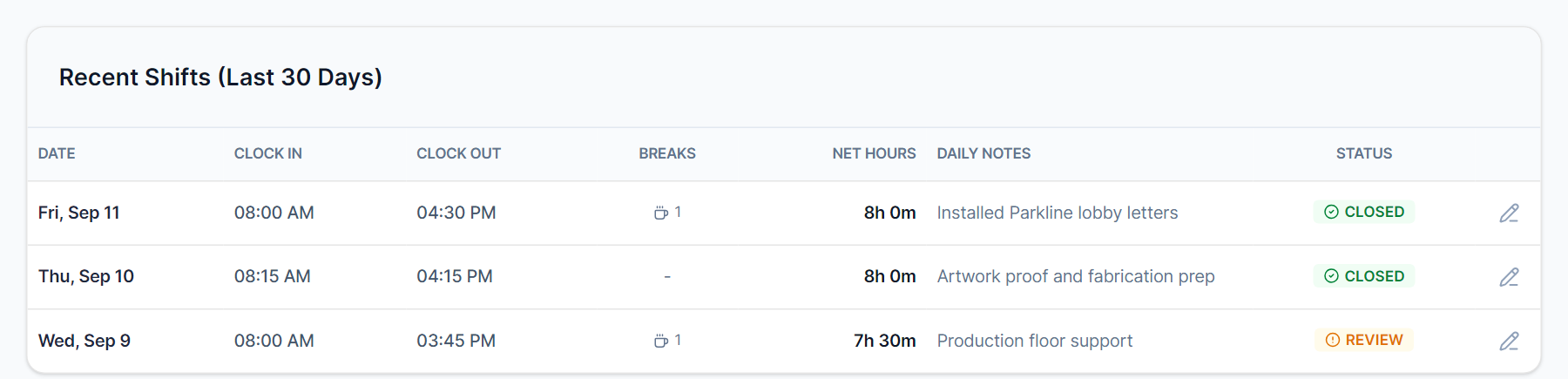
Employee timesheet and hours tracking dashboard

Deep Labor Cost Analytics

Cross-reference tracked time against specific client projects or internal departments. Our labor reporting clearly visualizes which projects are profitable and which are bleeding money due to excessive hour consumption, allowing managers to tightly optimize resource allocation.

Payroll reporting and labor analytics UI

Frequently Asked Questions

Everything you need to know about Employee Timesheets & HR Payroll.

Can employees track time against specific jobs and clients?
Yes. Every time entry can be tagged to a specific job ticket, client, department, or project. This gives you granular job-level labor cost reports — so you can see whether your most demanding clients are actually your most profitable ones.
Does the system automatically calculate overtime?
Yes. Define your overtime rules — 40 hours per week, 8 hours per day, or state-specific thresholds — and the system segments regular and overtime hours automatically. Overtime rates apply at the configured multiplier and appear on the payroll export.
How do timesheets connect to job costing and margin reports?
Labor entries from timesheets roll directly into the job cost sheet for each production job. You see material cost + labor cost + overhead to get true gross margin per job — visible in the Accounting Suite. This is where most sign shops discover which job types they're actually losing money on despite billing the standard rate.
Can shop floor employees clock in without needing a computer at their station?
Yes. Employees can clock in from any web browser — including a tablet mounted on the shop floor, a shared workstation, or their phone. IP restriction and geofencing options ensure they're only clocking in from authorized locations.
What payroll integrations does Meet SIGNEXA support?
Meet SIGNEXA exports timesheet data as a CSV that includes regular hours, overtime, PTO, and department breakdowns. You take that export into your payroll provider of choice — Gusto, ADP, QuickBooks Payroll, or any processor that accepts a CSV. Meet SIGNEXA does not process payroll directly; it gives your payroll provider the clean hours data it needs.
How does the timesheet module handle PTO and time-off requests?
Managers can configure PTO policies and approve time-off requests directly in the Timesheets module. Approved PTO is reflected in the weekly timesheet and accounted for in payroll exports. Team availability for scheduling and the Calendar reflects approved PTO automatically.

Ready to Transform Your Workflow?

Join thousands of shops scaling their operations with Meet SIGNEXA. No credit card required.